How it works
A Clear Scope. A Practical Change.
From a first look to a hands-on cleanup, you choose the next step.
A closer look. A clearer next step.
Start small. Decide how far to go.
-
Send your website.
A free Pigeon Check compares the companies your homepage contacts with your privacy policy. One page, by email.
-
Understand the findings.
A Pigeon Report takes a closer look at the agreed pages. Get the evidence, a fix list and a walkthrough call.
-
Make room for better.
Approve the changes and the quote. We carry out the Cleanup, then re-check the same pages.
-
Keep an eye on it.
Optional Pigeon Watch checks for changes each month, so new tools and outdated policy wording get your attention.
See it for yourself
What one small website shares.
This is a fictional florist's website. Choose a tool to see what it receives, then try a cleanup and watch the connections change.
Fern & Finch
A fictional neighborhood florist
Before Cleanup
Choose a connection to exploreSelect a tool to update the Selected connection panel. Use Tab or the arrow keys to explore the tools.
- on page load
- 6
- wait for a click
- 0
- removed
- 0
6 connections on page load, 0 waiting for a visitor's click, and 0 removed. Site analytics and Workshop booking stay connected in this example.
Choose individual changes
0 of 4 changes applied
See what changed.
The handover shows what we changed, what we tested and what still needs a decision. The sample report shows how the evidence fits together.
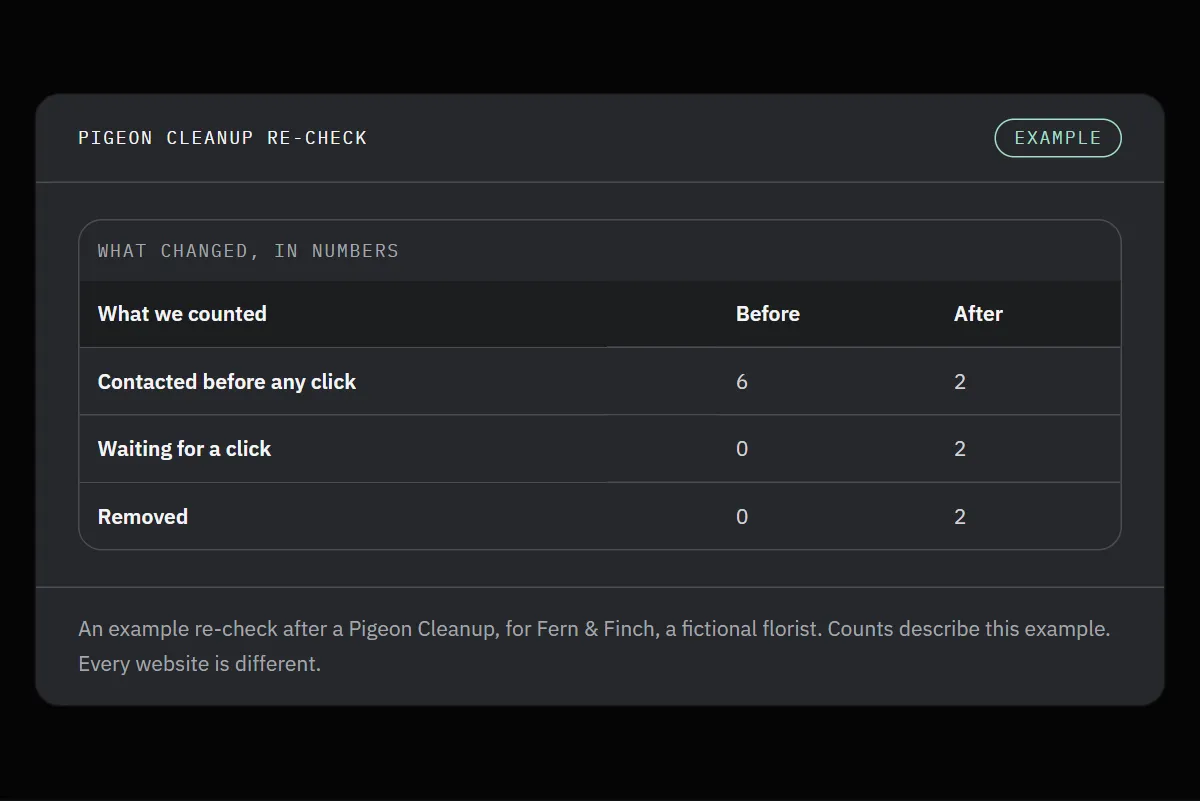
An example re-check for Fern & Finch, a fictional florist.

Free Pigeon Check
Wonder who your website talks to?
Send your website address for a free Pigeon Check. One page of findings, straight to your inbox.